Inhalt
05.3 Participants / Distribution list: Advanced settings
Click on Manage Participants (1) in the report protocol toolbox or right-click on the desired report (2) and then select Manage Participants (3) to edit the advanced settings for participants/distribution list.
Managing participants consists of three areas:
-
Project Address Book (1): Drag participants into your distribution list as you did in the protocol view and define their attendance (2).
-
Through the toolbox, you can adopt the sorting defined in the project address book (3) (Chapter 4.2) and add affected individuals from Report Items into the distribution list (4).
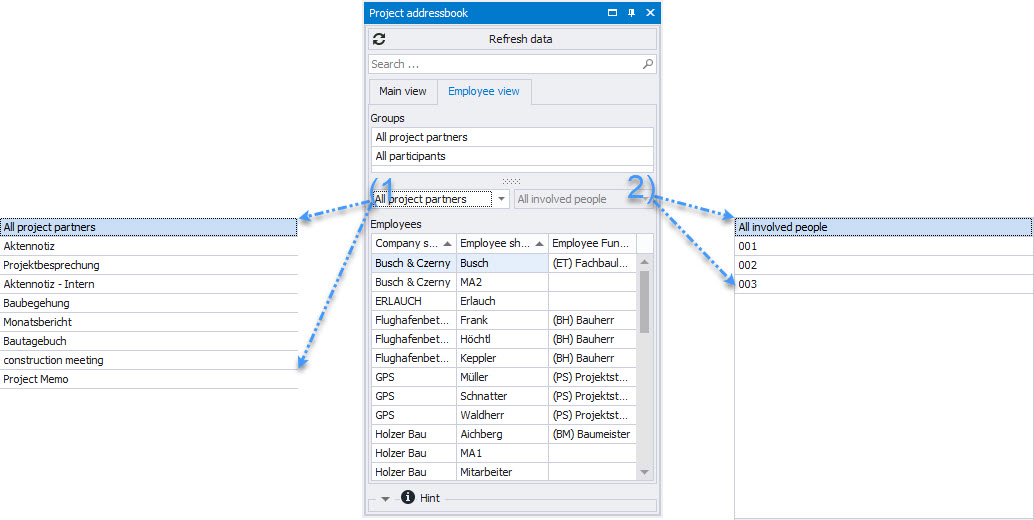
The project address book can also be filtered by participant/distribution lists.
-
Main view: Project partners grouped by company.
-
Employee view: Shows all project partners.
-
Filter by all project partners or a specific meeting group (1).
-
Further filtering can be done by filtering for a specific report (2), e.g., all participants of the previous meeting.
-
You can also directly find the desired company/person in the search field.
-
Distribution: Defines the document's distribution group. It is also used for automatic email distribution of the protocol (1).
-
Attendance can be added with "Partially Present" and time or replaced by "Excused" (2).
To print these, an appropriate print template must be set (For simple layout optimization, please contact our support). -
Sorting can be changed via drag & drop.
-
All participants in the standard distribution list are automatically carried over to the next meeting (3).
-
-
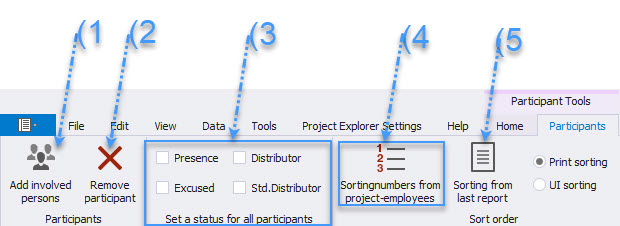
The following actions are simplified in the menu bar:
-
Affected project partners, e.g., those entered as responsible for a point, can be added to the distribution list (1).
-
Remove selected participants (2).
-
The status for all participants can be defined with one click (3).
-
Adopt sorting from the project address book (4).
-
Adopt sorting from the last report (5).