Inhalt
13.5 Print settings for Report Items
Report Item Settings / Print (1)
-
Start the report on the cover page (2)
-
Do not print report items that have no content (3)
-
Define how many contents from the report item history should be printed (4) e.g., the last three contents
-
Highlight new report item contents (5) (Example in Chapter 14.6)
In the print settings for report items (1), you have control over the presentation of your reports.
You can choose to start the report directly on the cover page (2) and specify that report items without content do not appear in the printout (3).
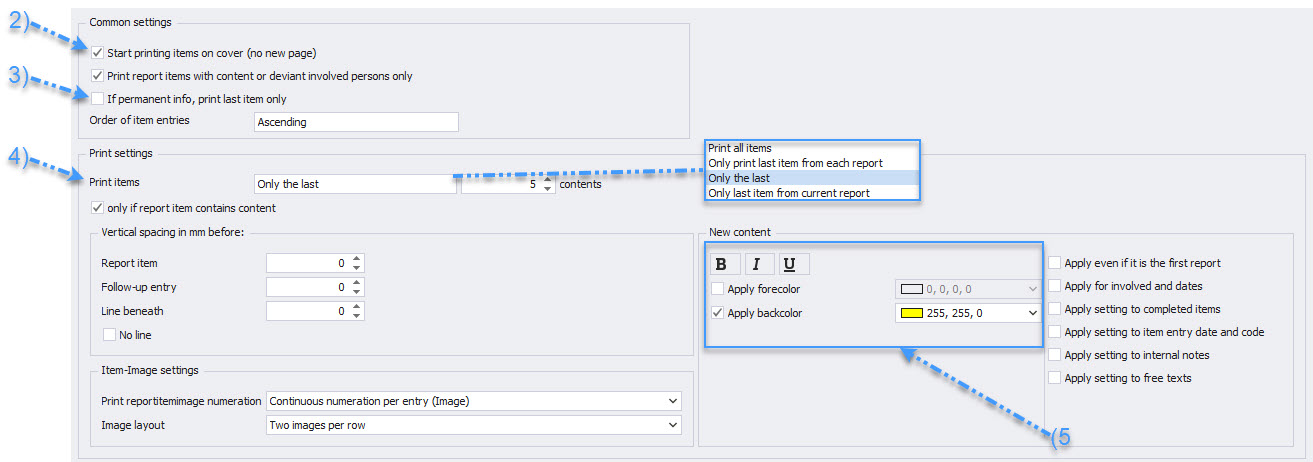
You can also decide how extensively the history of the report items is presented, for example, by printing the last three contents (4).
Additionally, you have the option to highlight new contents within a report item in the printout (5) to clearly indicate changes or updates.