Within the report items and distribution lists of a project, you can replace an employee with another project-specific employee. This replacement affects the entire project, including all participant lists and the responsible persons for individual report items.
To replace an employee, proceed as follows:
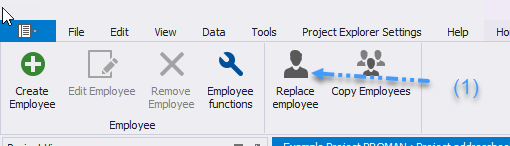
* Open the "Replace Employee" function from the menu bar in the Project Address Book (1).
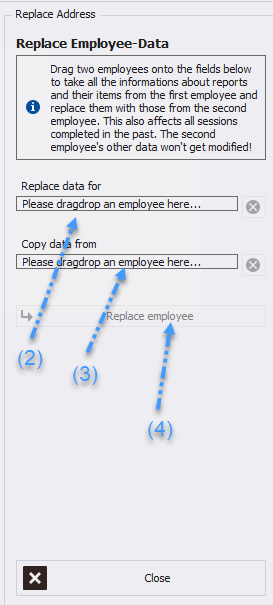
 * Drag the employee to be replaced from the Project Address Book into the designated field (2).
* Add the employee who will replace them (3).
* Finally, click "Execute Replacement" to complete the process (4).
* Drag the employee to be replaced from the Project Address Book into the designated field (2).
* Add the employee who will replace them (3).
* Finally, click "Execute Replacement" to complete the process (4).