Inhalt
02. Create project
Mehr
02.4 Project template
-
To quickly customize a project, templates from any project can be adopted.
-
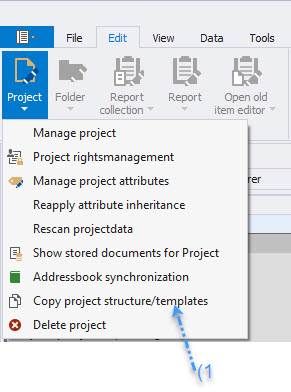
This can be done directly when creating the project or for an existing project via the menu bar "Adopt Project Structure/Templates" (1) or by right-clicking in the Project Explorer (2).
-
-
In the menu (1), select a project from which the templates should be imported.
-
Use the copy buttons (2) to adopt individual elements.
-
In the toolbox (3), many other templates are available, such as project addresses, attributes, and functions that can be imported.
-
The "Quick Selection" button (4) allows you to quickly adopt all structural data or all structural data without project participants.